
Open source computer use API
Donkey Vision finds every interactable element in a screenshot — buttons, icons, inputs, rows — and returns each one’s box, center point, and label. It reads pixels, so it works on software that exposes no API at all.
The same screen-understanding layer Donkey uses to read and drive apps on your Mac.
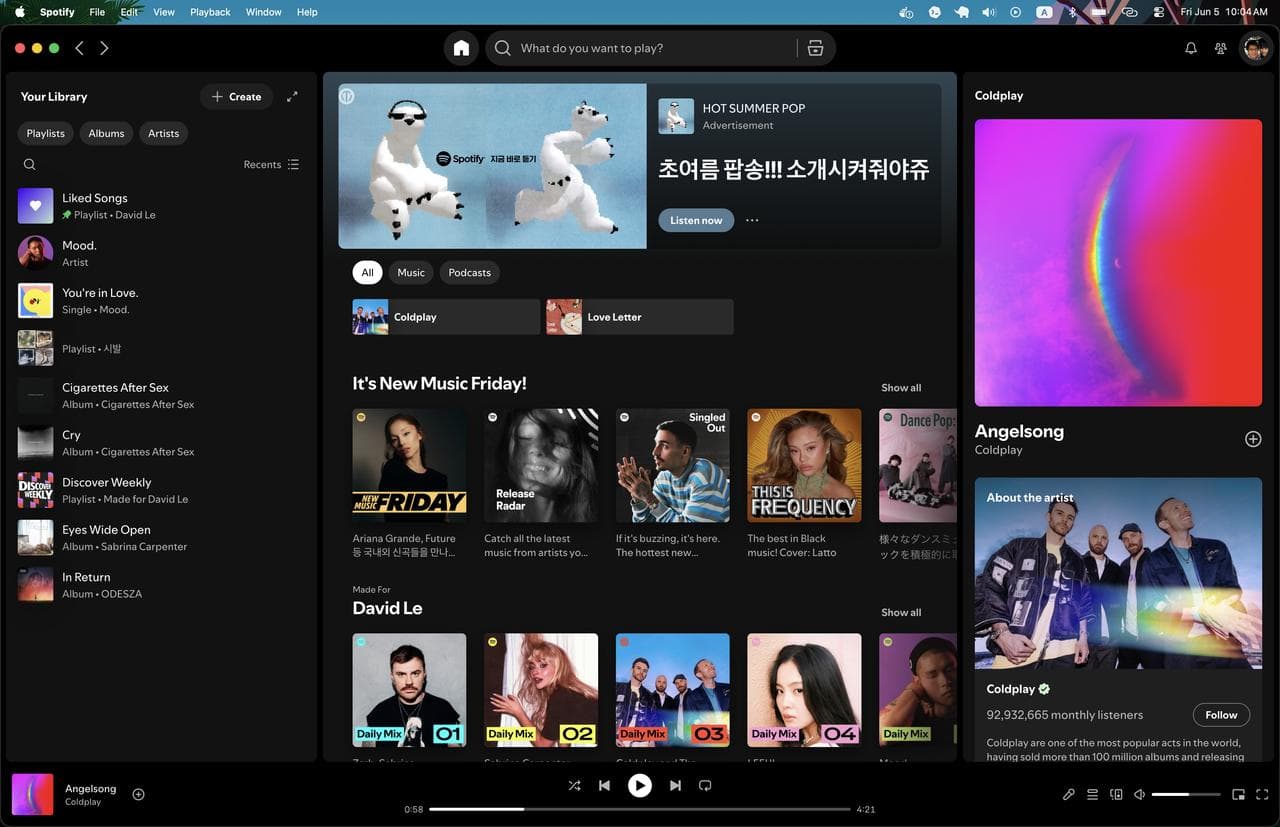
Process a screenshot into structured UI elements — boxes, labels, OCR, and click coordinates — in under a second.
Latency numbers show server processing time only. Total request time also depends on image size, upload speed, network latency, and any queueing.
Drag to see what it reads.
Left is the raw screenshot. Right is the same pixels with every detected control boxed and labeled. Drag the handle — no DOM, no integration, just the image.
How the API works
Send a screenshot to /api/vision. The response includes detected UI elements with IDs, labels, types, bounding boxes, center points, and confidence scores.
Add an optional text instruction, such as click the play button, to return the matching click target. Model selection supports ChatGPT, Claude, Gemini, or a custom model.
Detected elements
Buttons, icons, inputs, links, rows, text targets, and other visible UI regions.
Coordinates
Bounding boxes and center points are returned in the original screenshot coordinate space.
Labels and types
Each element includes a readable label and kind, such as button, input, icon, or text.
Prompt-to-click
Natural language instructions return the matching element, click point, and region.
Detection options
Per-request thresholds control detection sensitivity and element merging.
Model choice
Prompt-based targeting supports ChatGPT, Claude, Gemini, or a custom model.
/api/visionAuth: Authorization: Bearer dk_live_...
Request
Submit a base64 screenshot. Add an optional instruction to return a matching click target.
const res = await fetch("https://donkeyuse.com/api/vision", {
  method: "POST",
  headers: {
    Authorization: `Bearer ${process.env.DONKEY_API_KEY}`,
    "Content-Type": "application/json",
  },
  body: JSON.stringify({
    // base64 png/jpeg/webp, no "data:" prefix
    image: screenshotBase64,
    instruction: "click the play button",
    returnElements: true,
  }),
});

const { target } = await res.json();
console.log(target.point); // { x, y } — ready to click
Body parameters
- imagestringrequired
- Base64-encoded screenshot. Supports PNG, JPEG, and WebP. For best results, use JPEG quality
0.8and resize the longest side to1568px. - instructionstringoptional
- Natural language click instruction, such as
click the play button. When provided, the response includes a matching click target. - modelstringoptional
- Model used for prompt-based targeting. Supported options include
gemini-3.5-flashandgemini-3.1-flash-lite. Defaults togemini-3.1-flash-lite. - returnElementsbooleanoptional
- Controls whether the full detected element list is returned. Defaults to
true; disabled automatically when an instruction is provided.
Response
Coordinates are pixel values from the submitted screenshot, measured from the top-left corner.
{
  "image": { "width": 1440, "height": 900 },
  "elements": [
    {
      "id": "a92kfq",
      "label": "Play",
      "kind": "button",
      "interactive": true,
      "box": { "x": 618, "y": 816, "width": 42, "height": 42 },
      "point": { "x": 639, "y": 837 },
      "confidence": 0.82
    }
  ],
  "target": {
    "elementId": "a92kfq",
    "label": "Play",
    "kind": "button",
    "box": { "x": 618, "y": 816, "width": 42, "height": 42 },
    "point": { "x": 639, "y": 837 },
    "confidence": 0.91
  },
  "alternates": [],
  "model": "gemini-3.1-flash-lite"
}
Response fields
- imageobjectoptional
- Screenshot dimensions in pixels:
{ width, height }. - elementsarrayoptional
- Detected UI elements. Each element includes
id,label,kind,interactive,box,point, andconfidence. Omitted whenreturnElementsisfalse. - targetobject | nulloptional
- Best matching click target for the provided instruction. Includes the target element, bounding box, and click point. Returned only when
instructionis provided. - alternatesarrayoptional
- Additional possible matches for the instruction, sorted by confidence.
- modelstringoptional
- Model used for prompt-based target selection.
Use screenshots when there is no API.
Send a screenshot from any application. Donkey Vision returns detected UI elements, labels, bounding boxes, center points, and optional prompt-matched click targets.
Computer-use agents
Give agents the current screen state before taking action. Return clickable elements, coordinates, labels, and prompt-matched targets for tasks like click the play button.
Screenshot parsing
Convert screenshots into structured UI data: detected elements, text labels, element types, bounding boxes, and center points.
Video frame analysis
Parse video frames into UI element timelines. Track visible controls, labels, and screen changes across demos, workflows, and regression tests.
Cross-app automation
Find click targets across native apps, web apps, Electron apps, VNC sessions, and remote desktops without DOM access or app-specific selectors.
Works anywhere a screenshot can be captured.
Donkey Vision analyzes pixels directly. No DOM access, private integration, app-specific setup, or brittle selectors required.
The same API request can process native apps, browser tabs, Electron apps, remote desktops, and other screenshot-based environments.
- Native macOS apps
- Web apps in any browser
- Electron and hybrid apps
- Remote desktops and VNC sessions
- Enterprise and internal tools
- Games and media players
Get Donkey Vision API access.
Starts at $50/month
Start detecting clickable elements from screenshots in minutes. Donkey Vision returns UI boxes, center points, labels, and prompt-matched click targets for computer-use agents.
- 5,000 API calls per month
- 3 requests per second
- Detect UI elements, boxes, center points, and labels
- Prompt-to-click targeting for actions like “click the play button”
Need higher call volume or rate limits? for increased limits.